Left Continuar la compra
Pedido

Su carrito actualmente está vacío.

May we Recommend...
De $207.00
Mostrar opciones
Proud Family History - AED Professionals
Thank you for choosing AED Professionals!
From Our Family to Yours, We Truly Appreciate it!

ZOLL AEDtrax – Simplify AED Readiness and Management

Alt image Alt image Alt image

ZOLL AEDtrax – Simplify AED Readiness and Management

Narcan nasal spray used to reverse opioid overdoses quickly and effectively.

Always ready. Always connected.

AEDtrax helps ensure your ZOLL AED 3 is rescue-ready when seconds matter most. This independent, externally mounted monitoring module delivers continuous 24/7 cellular connectivity, providing daily status reporting, real-time alerts, and cloud-based visibility into every connected AED.

Designed to streamline AED program management, AEDtrax automatically monitors device readiness, including battery life, electrode pad expiration, connectivity status, GPS location, motion activity, and environmental conditions such as temperature, humidity, and pressure. Unlike solutions that rely solely on Wi-Fi or embedded connectivity, AEDtrax operates independently with minimal impact on AED battery performance and stores data securely if cellular coverage is temporarily unavailable.

Alt image

The result is simplified inspection readiness, stronger regulatory compliance, and confidence that your AEDs are always prepared to respond in a sudden cardiac arrest emergency.

Explore

what is the zoll aedtrax

Maintaining an AED program isn’t just about mounting a device on the wall, it’s about ensuring every unit is rescue-ready at all times. AEDtrax is an independent, externally mounted smart monitoring module designed specifically for the ZOLL AED 3. When paired with PlusTrac, it creates a fully connected, cloud-based AED management solution that delivers 24/7 remote monitoring, real-time alerts, GPS tracking, and automated compliance reporting across single or multi-site programs.

Unlike embedded connectivity systems that rely on internal power or limited Wi-Fi coverage, AEDtrax operates independently with seamless mobile cellular connectivity. This allows continuous data storage and transmission, even outside Wi-Fi zones and in rural or remote locations. The system reports in daily, unlike many connected AED solutions that only check status monthly, giving safety coordinators up-to-date visibility into device readiness without draining the AED battery.

  • Continuous 24/7 monitoring of connected AEDs ensures you’re alerted immediately if any component needs attention.
  • Location tracking, environmental status, and deployment alerts provide full visibility for campus, corporate, public access, and multi-site programs.
  • Drives compliance and accountability, a key consideration for organizations with AED programs and regulatory obligations.

Your AED program deserves more than a static device on a wall. With ZOLL AEDtrax integrated with PlusTrac, your devices are continuously monitored, your team is informed, and your readiness is verifiable. When sudden cardiac arrest happens, every second matters, and confidence in your equipment can make all the difference.

Why Choose ZOLL AEDtrax

Automated Readiness Monitoring

No more manual inspections or guesswork. The AEDtrax automatically verifies the status of your ZOLL AED 3, including battery, pads, and self-test results.

Total Program Visibility

Access a simple online dashboard to see the real-time readiness, location, and maintenance history of every AED in your organization.

Regulatory Compliance Made Easy

Stay inspection-ready with automated alerts, event tracking, and detailed reporting that supports AED program compliance requirements.

Seamless Connectivity

Built-in 4G LTE and GPS technology ensure each AED stays connected and easy to locate, even across multiple facilities or remote sites.

Peace of Mind 24/7

AEDtrax continuously monitors and updates your AED’s performance data, so you can focus on saving lives, not managing equipment.

How to Setup

  • Prep & Device Identification

  • Hardware & Cable Installation

  • AED Configuration & Settings

  • Data Export & Shutdown

  • Platform Setup & Optional Accessories

Step 1

Title

Remove the AED 3 electrode pack from the electrode compartment.


Note the serial number of the AED (on the back; starts with "AX…..") and the Trax number (on the top; starts with "TH……")

Step 2

Title

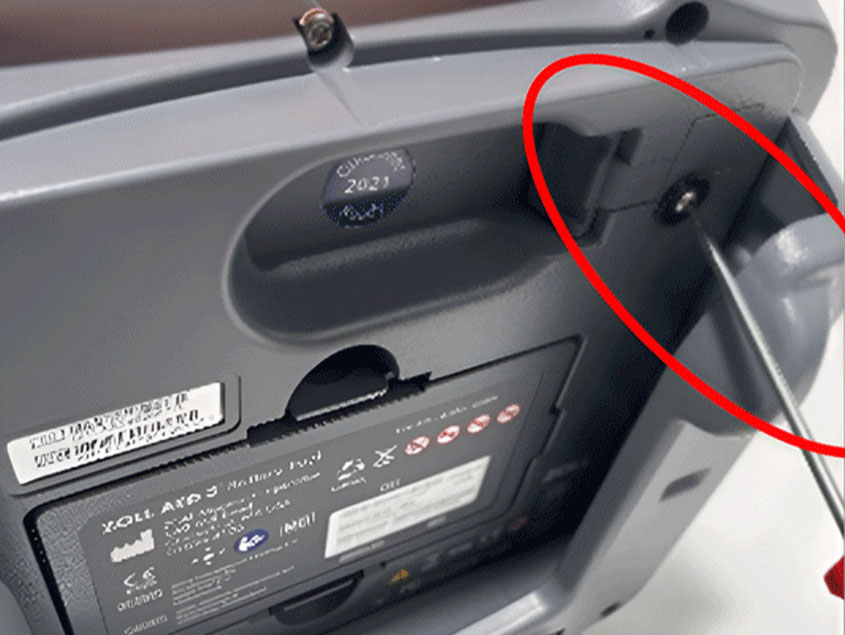
Using a Torx T8 screwdriver, remove the screw of the rubber seal on the back of the AED and dispose of the rubber seal along with the black washer (keep the screw). 

Paso 3

Title

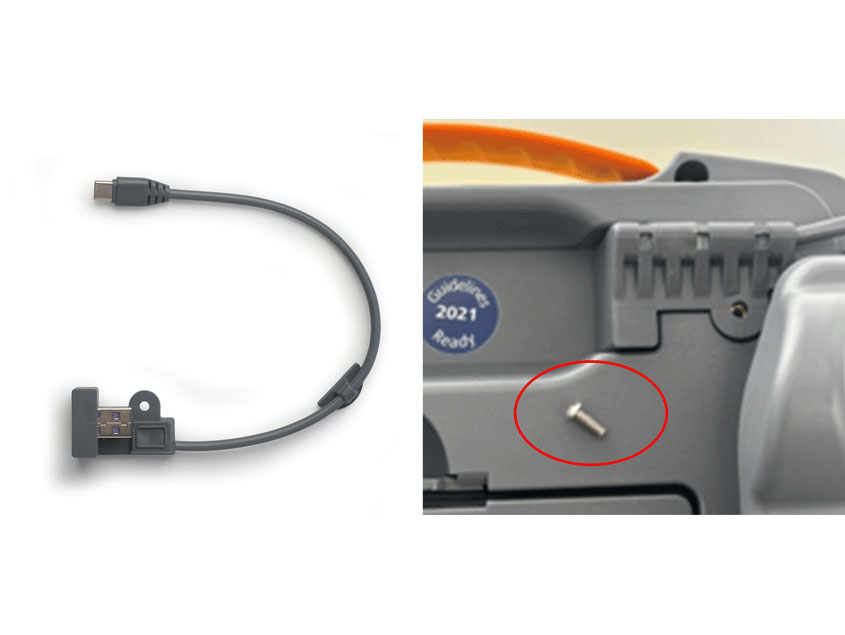
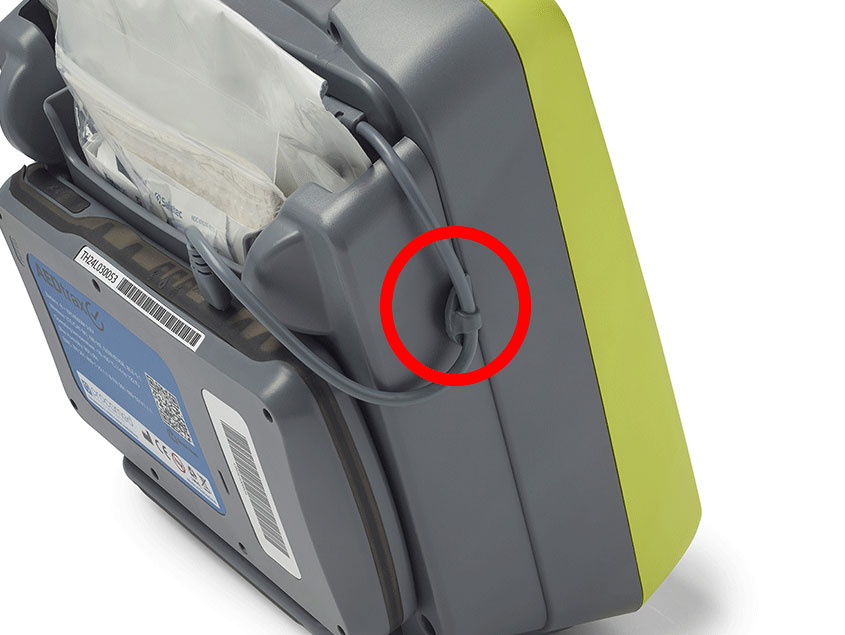
Conecte el cable USB suministrado en la parte posterior del DEA y vuelva a colocar el tornillo que retiró anteriormente. 

Paso 4

Title

Limpie el borde derecho de la carcasa del DEA (visto desde atrás) con un desengrasante (por ejemplo, bencina de limpieza). 

Paso 5

Title

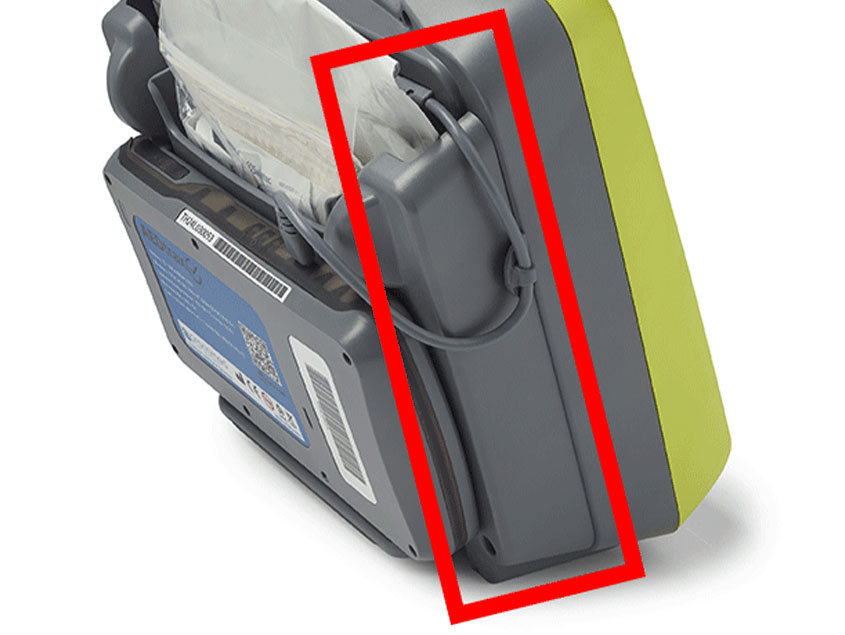
Retire la película protectora del sujetacables y fíjelo al borde de la carcasa del DEA. 

Paso 6

Title

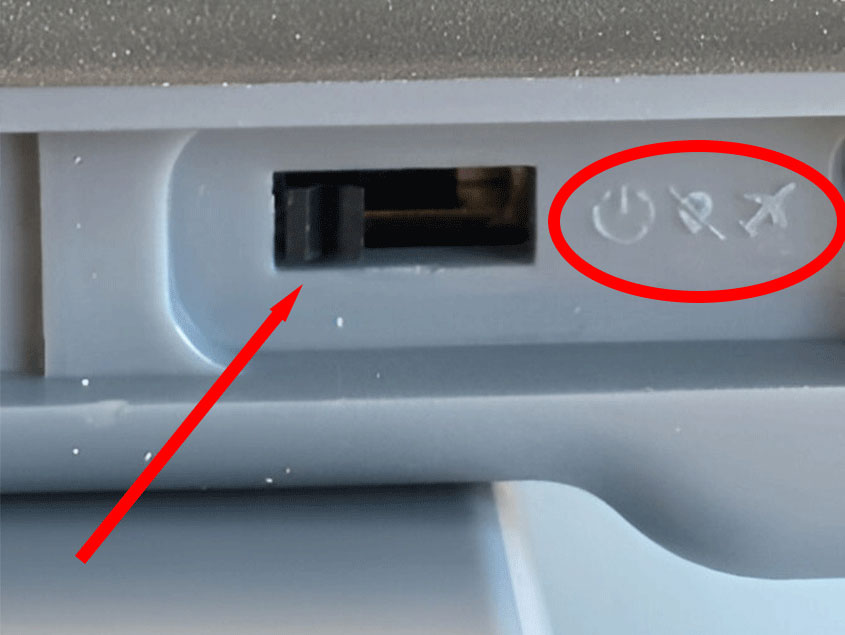
Abra el sello de goma en trax y enciéndalo usando un alfiler de metal delgado (por ejemplo, un clip)
posición central: trax ENCENDIDO, GPS APAGADO
posición izquierda (recomendado): trax y GPS ENCENDIDOS
posición derecha: trax apagado

Paso 7

Title

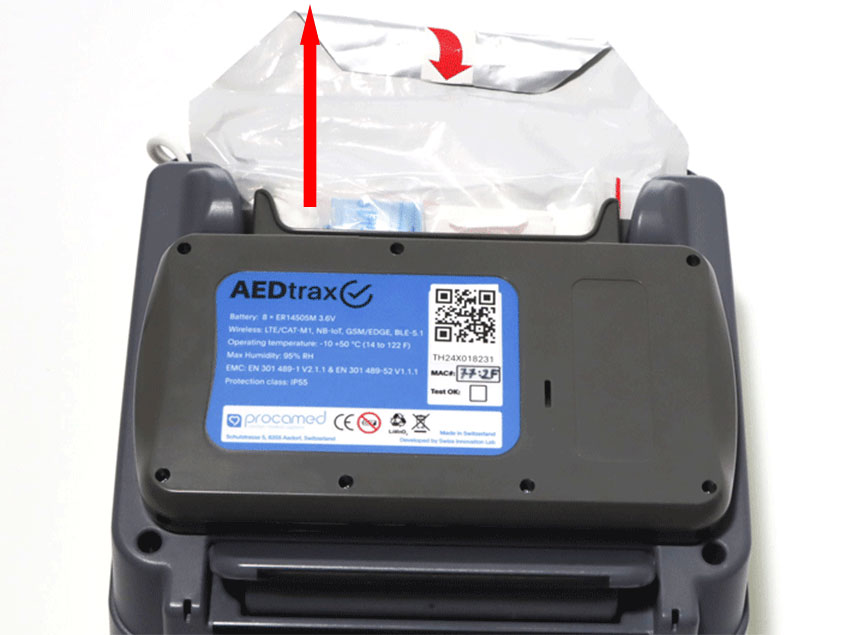
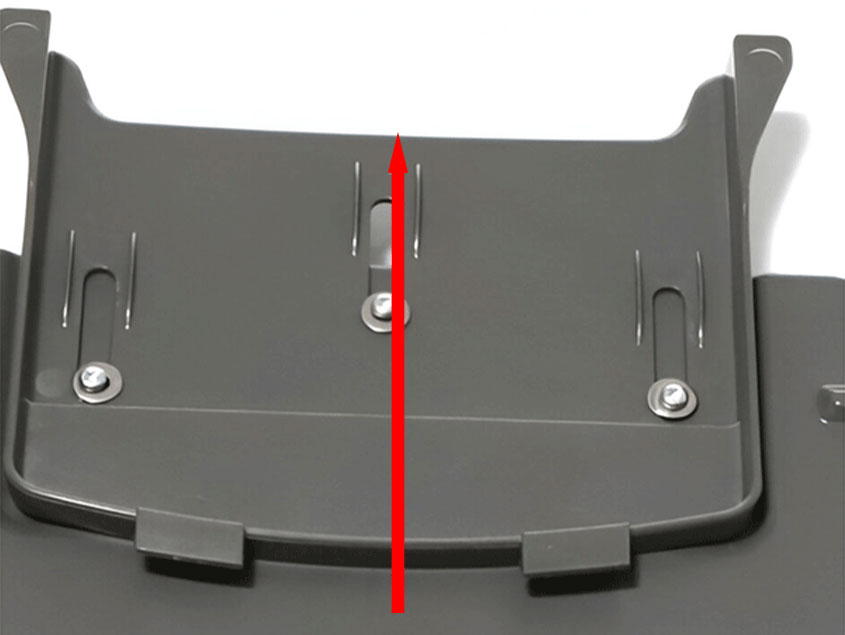
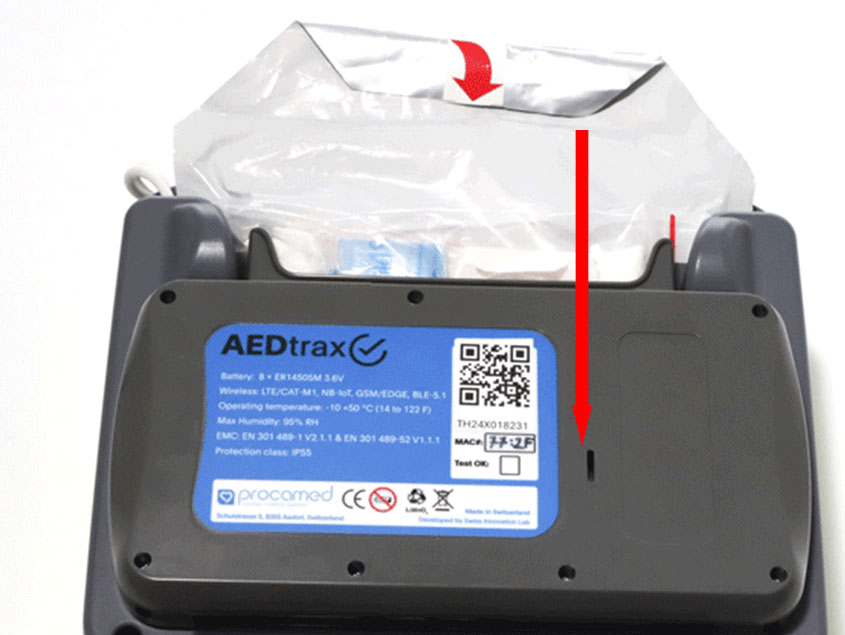
Tire de la placa deslizante de trax hacia arriba, coloque trax contra el compartimento de los electrodos y luego empuje la placa deslizante hacia abajo hasta que encaje en su sitio y se conecte con el DEA. 

Paso 8

Title

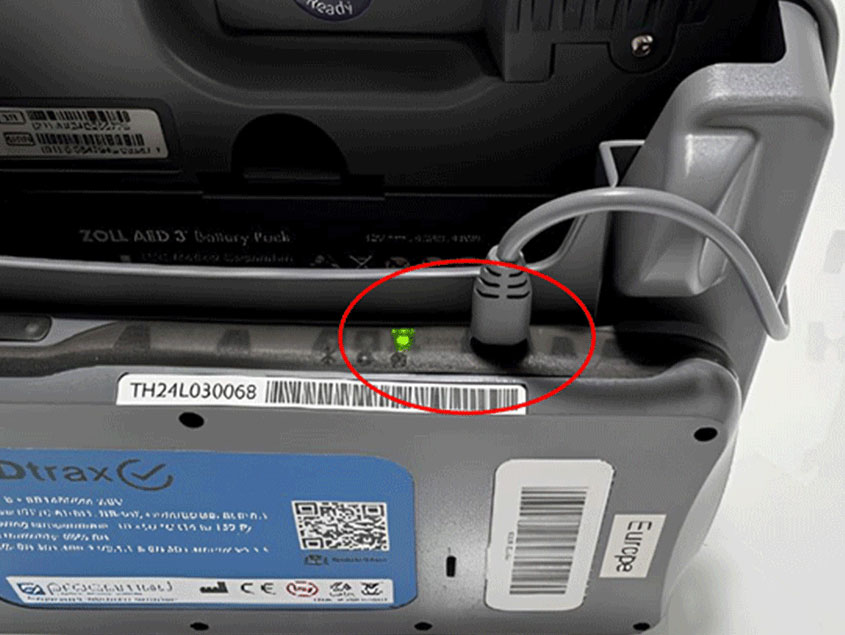
Inserte el conector USB-C en trax y compruebe que el cable esté bien organizado.
 

Paso 9

Title

Vuelva a colocar los electrodos en el compartimento de los electrodos (las tijeras mirando hacia el DEA y el kit de emergencia mirando en dirección opuesta al DEA).
 

Paso 10

Title

Configure el DEA:


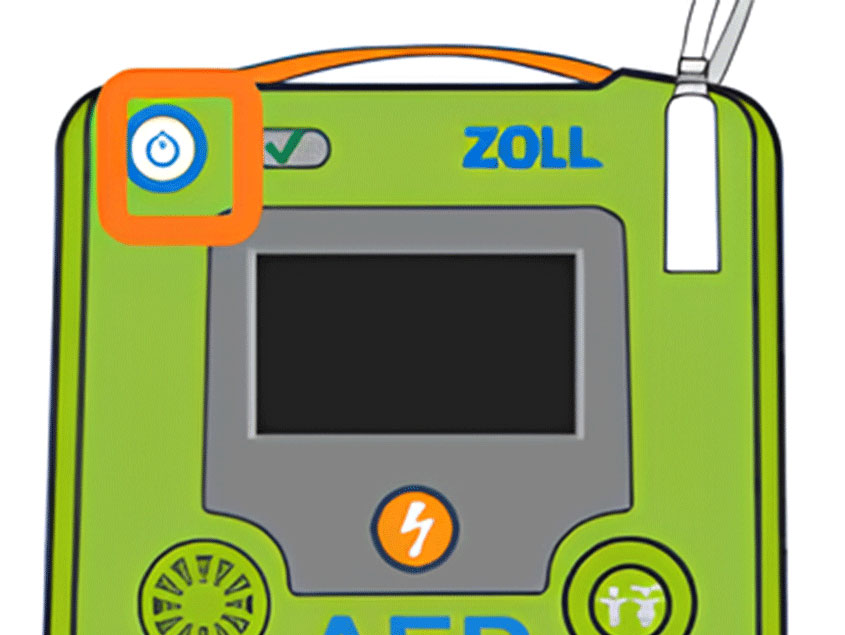
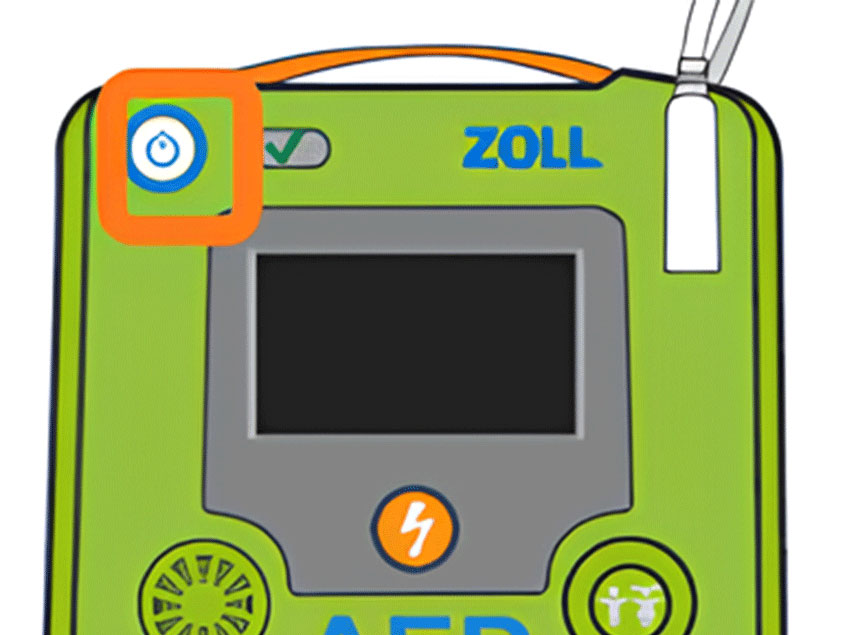
Encienda el ZOLL AED 3 en modo sin rescate. Mantenga pulsado el botón "ON/OFF" durante 10 segundos o hasta que vea el logotipo de ZOLL.

Paso 11

Title

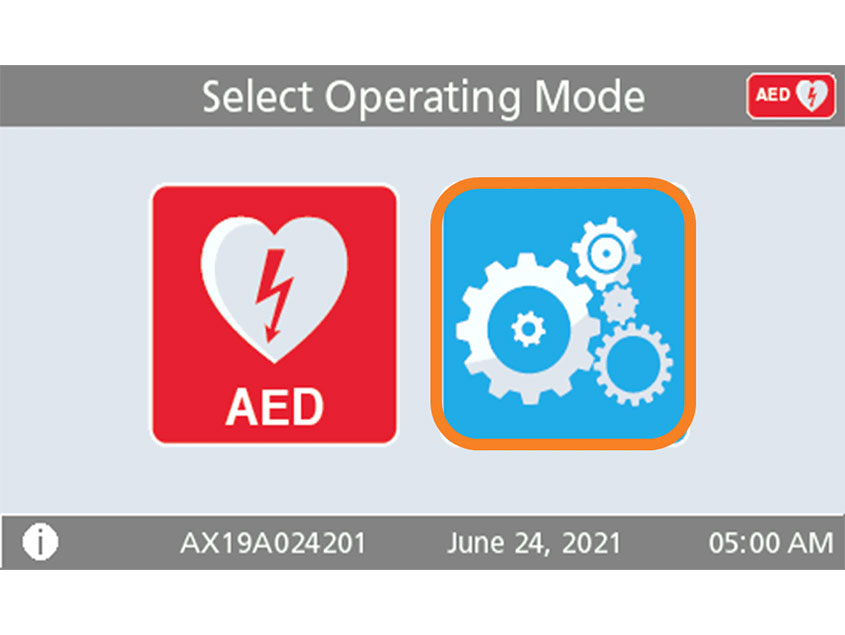
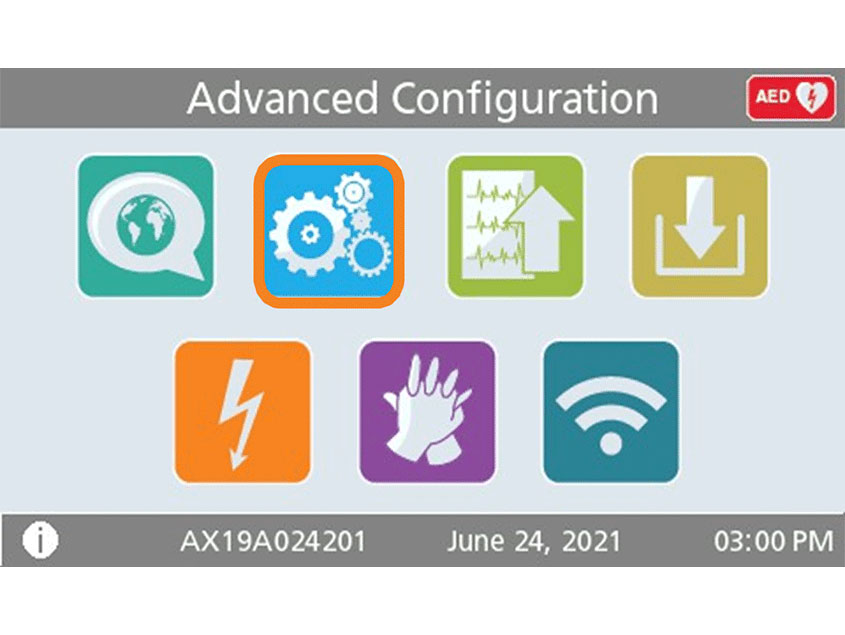
Pulse el icono de "Configuración del dispositivo" para abrir la pantalla de configuración.


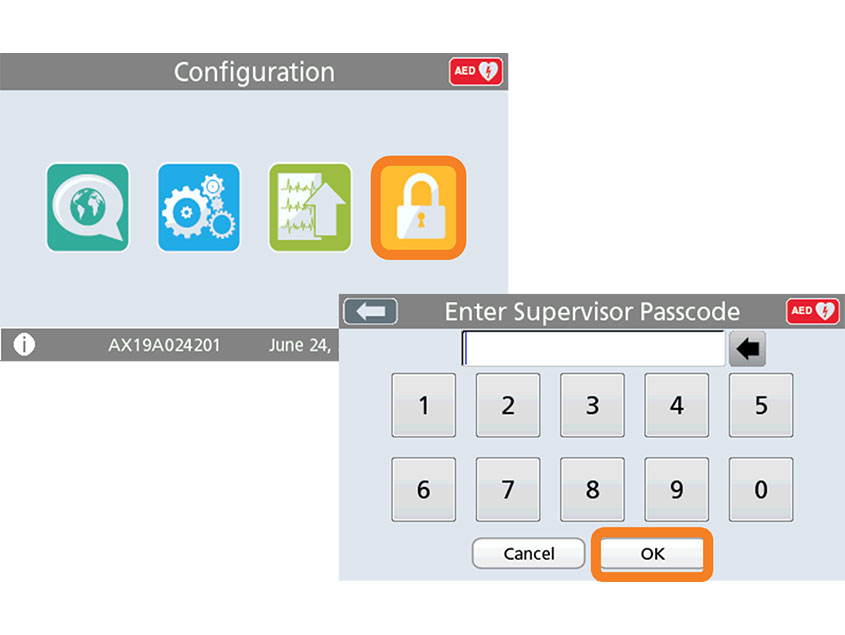
Pulse el icono de "Acceso de supervisor".

Paso 12

Title

Introduzca el código de 6 dígitos del manual de usuario y confirme con "OK".


Contraseña predeterminada: 5, 6, 7, 8, 9, 0

Paso 13

Title

Pulse el icono de «Configuración».

Paso 14

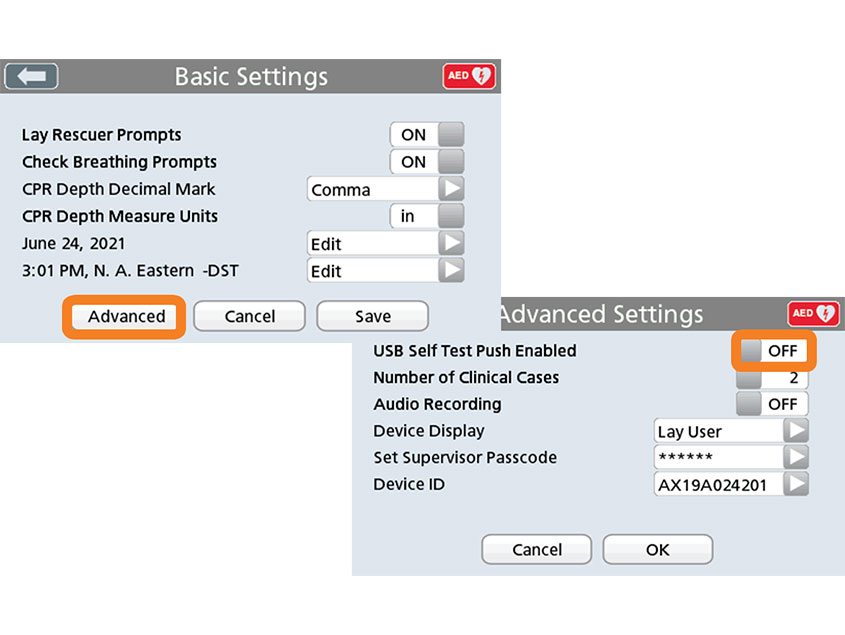
Title

Pulse "Advanced".


Establece "USB Self-Test Push Active" en "ON" y confirma con "OK" y "Save".

Paso 15

Title

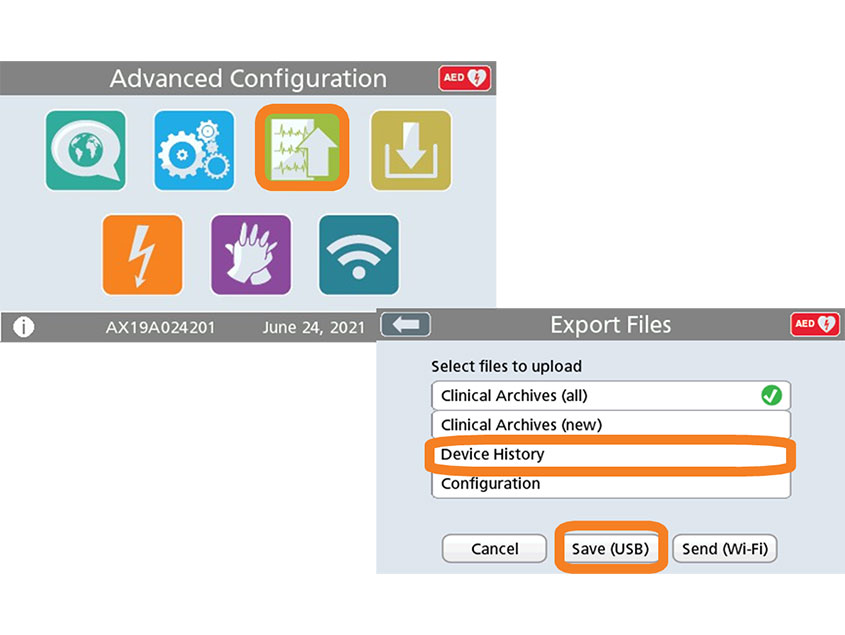
Pulse el icono de "Exportar archivos".
Seleccione "Datos del historial del dispositivo" y 
pulse "Guardar (USB)". 
Si aparece "Completado" al final, la transferencia se realizó correctamente. Confirme con "Aceptar".

Paso 16

Title

Apague el DEA 3 manteniendo pulsado el botón de encendido durante aproximadamente 2 segundos. El mensaje "Apagando" aparecerá en el monitor.

Paso 17

Title

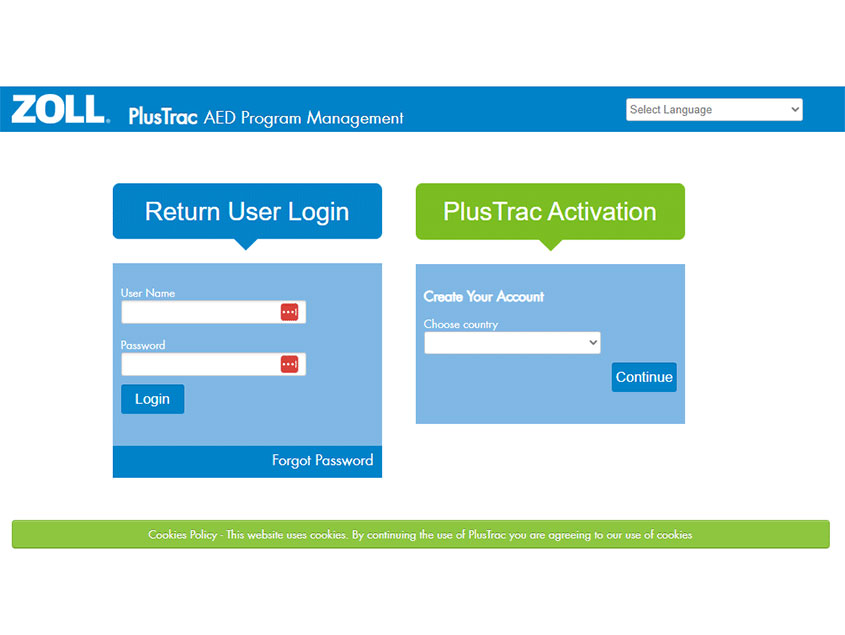
Inicie sesión en plustrac para configurar su dispositivo en la plataforma.

Paso 18

Title

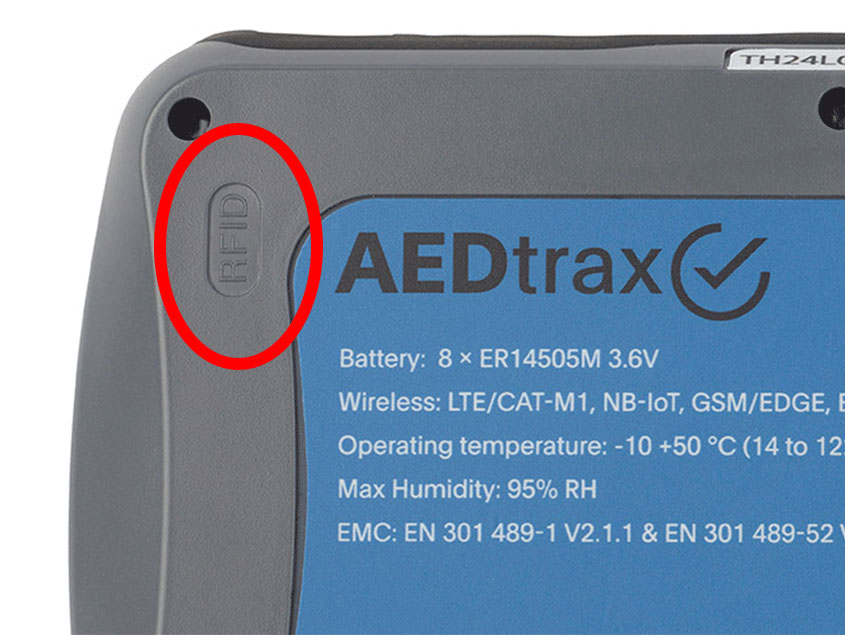
Si utiliza AEDtrax con la opción RFID, coloque la tarjeta RFID en una superficie firme. Si la superficie es metálica, utilice un espaciador de un mínimo de 5 mm hasta la tarjeta RFID. Coloque la tarjeta RFID en el gabinete de manera que pueda conectarse con la esquina superior izquierda de trax cuando se coloque en el gabinete.

Zoll AEDtrax

ZOLL

De

$544.87

AEDtrax ayuda a garantizar que su ZOLL AED 3 esté listo para usar cuando sea necesario. La conectividad móvil confiable le permite administrar y monitorear sus desfibriladores externos automáticos desde cualquier ubicación, incluso fuera de las zonas WiFi y en áreas rurales remotas. El GPS* y el seguimiento ambiental* significan que puede encontrar sus dispositivos en un mapa, recibir notificaciones automáticas si se utilizan y saber si existen condiciones dañinas en su entorno.


Monitoreo 24/7 de su ZOLL AED 3

  • Estado de la batería (vencimiento y porcentaje de vida restante)
  • Estado y vencimiento de los electrodos
  • Disponibilidad del DEA

Seguimiento de ubicación

  • Asigne RFID a las ubicaciones de almacenamiento para rastrear dónde se encuentra su ZOLL AED 3
  • RFID detectará la implementación del dispositivo y AEDtrax proporcionará notificaciones de implementación y movimiento

Monitoreo ambiental

  • Monitorea la temperatura, la humedad y la presión del aire

Localización GPS

  • Cuando se implementa un AEDtrax, recibe la ubicación GPS cuando está disponible

Notificaciones por correo electrónico

  • Reciba un correo electrónico cuando se utilice el DEA o si se requiere alguna acción

Seguro y transparente

  • Los datos son alojados por ZOLL Online con los más altos estándares de seguridad

Transmisión de datos del caso

  • AEDtrax transmite automáticamente la información de eventos clínicos.

Compatible con dispositivos nuevos y existentes

  • AEDtrax se puede adaptar fácilmente a un ZOLL AED 3 existente, con o sin estuche de transporte.


Comprar AEDtrax

Don't know where to start?

Our experts are here to help find the right fit for your needs. Give us a call today!

888-541-2337

AED Professionals: A General Medical Devices, Inc. company

348 W. Colfax Street, Palatine, IL 60067

info@aedprofessionals.com 847-202-3233

Subscribe to our newsletter. 

Provide your email for exclusive promotions, updates and more!

Thanks for contacting us. We'll get back to you as soon as possible.

By subscribing to our newsletter you agree to our privacy policy and will get commercial communication

Copyright © 2004-2024 General Medical Devices, Inc.

All Rights Reserved

Organizations Close to Our Hearts